•  
     
    story #24192 preview file name at upload
Summary
Empty
preview file name at upload
Empty

Overview

This is a follow-up of story #24166. The modifications proposed here will be available only of there is a pattern defined.

And the user uses Document interface to create new files, embedded files or new versions of those, Then the user should be able to see the generated filename In order to adapt "Version name" so the generated filename is consistent with already uploaded files.

Not covered in the story:

  • if user uses the legacy Docman interface, the filename & history is not displayed.
  • if user drag'n drop a file directly in the file tree, there won't be any "Version name" defined
  • if user upload a new file or version using WebDav, the pattern will not apply

Display of the file name

There are two places where this capability should be provided.

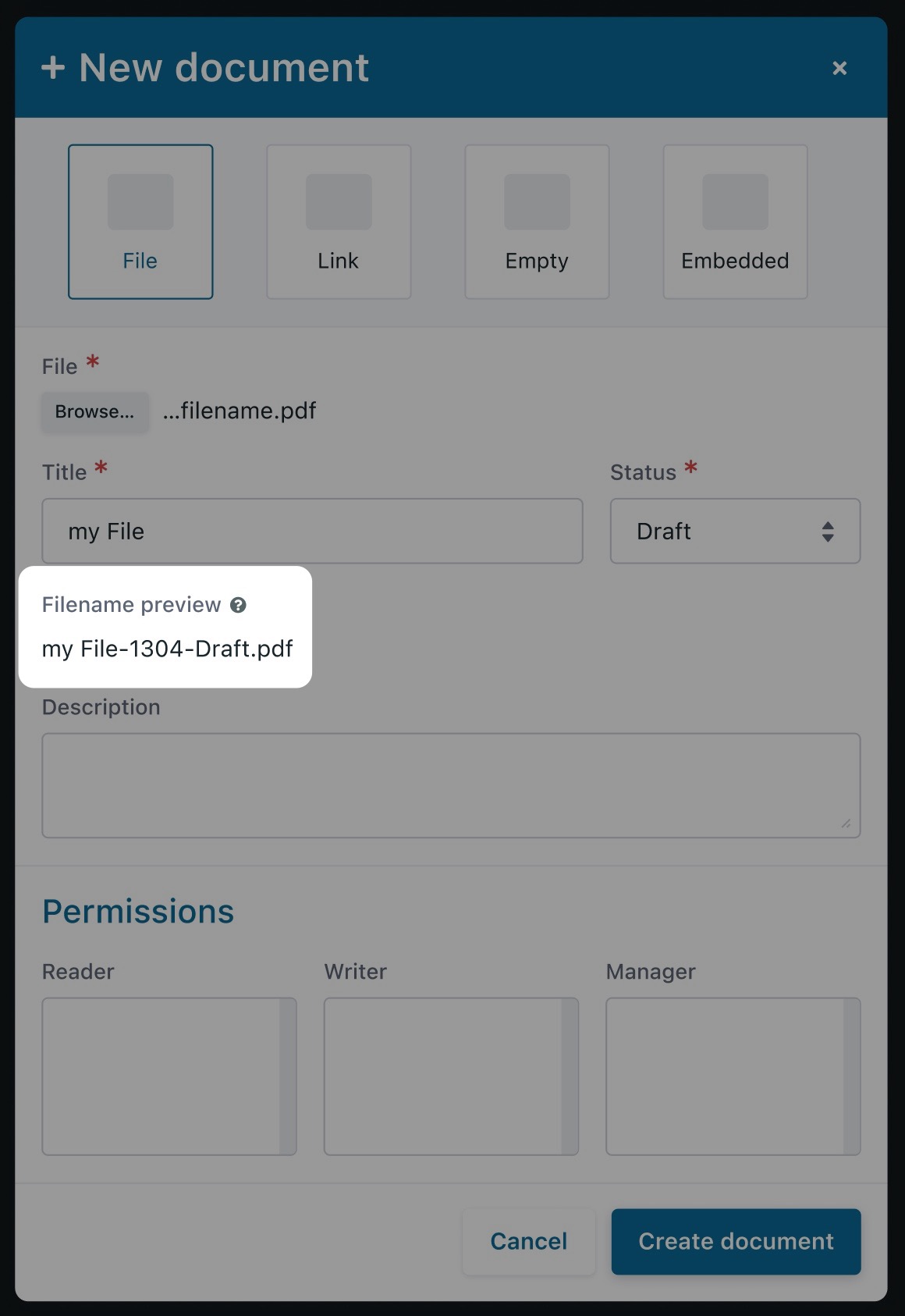
The creation of a new File (ie the initial version):
2359-screenshot-2021-12-15.jpg

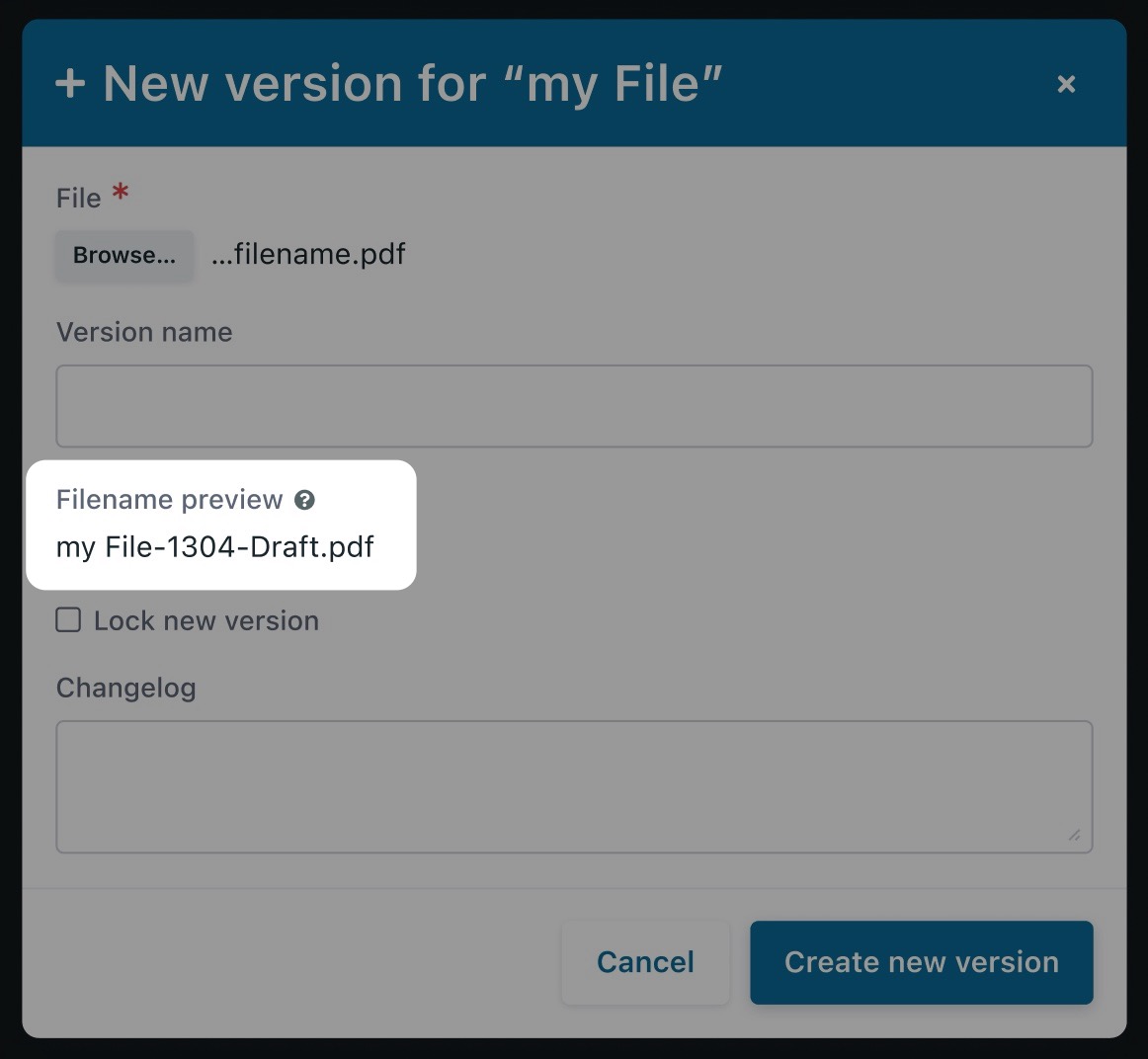
The creation of a new version of the file:
2360-screenshot-2021-12-15.jpg

In both screens we should have a "Filename preview" field, that cannot be modified by end user:

  • By default the field is empty (there is no file provided yet)
  • As soon as a file is selected (browse button) the filename preview is updated with:
    • The actual filename when there is no pattern defined
    • The transformed filename according to the pattern (updated as user types / select values)

New version, display of history

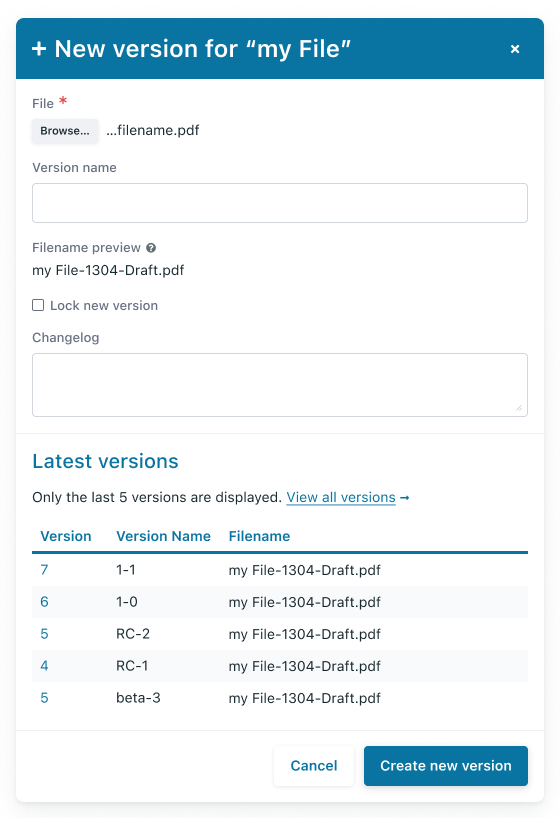
The history is displayed only if there is a pattern defined.
2377-File%3DFilled%2C%20Previous%20version_%3DTrue.jpg

When users have to modify the filename, it often has to be consistent with the naming that was done with previous versions.

Hence, the the "New version" modal is updated to list the last 5 versions of the file (Version number + Version title in descending order).

When there is more than 5 versions in the history, there is a link to the "history" page of the document.

New file and ${ID} in pattern

When there is a new file, the exact filename cannot be displayed if the pattern contains ${ID} because the file id is not yet know.

Hence the displayed filename will contains ${ID} variable instead of the actual id.

Example:

  1. Pattern is ${ID}-${TITLE}-${VERSION_NAME}
  2. Creation of new file "HW Specifications"
    1. User sees as generated filename ${ID}-HW Specifications- (note the final -)
    2. User creates the document
    3. Document is created and filename is 12323-HW Specifications-
  3. Creation of a new version for "HW Specifications"
    1. User sees as generated filename 12323-HW Specifications-
    2. User types V1_APP
    3. User sees as generated filename 12323-HW Specifications-V1_APP
    4. User saves the new version
    5. New version is created and filename is 12323-HW Specifications-V1_APP
  4. User look at history, they see:
    • v1 - 12323-HW Specifications-V1_APP
    • v0 - 12323-HW Specifications-

Figma : https://www.figma.com/file/0U4874nbYDlRBc56W1d4K3/Documents---story-%2324192?node-id=0%3A1

Empty
Status
Empty
Done
Development
  • [ ] Does it involves User Interface? 
  • [ ] Are there any mockups?
  • [ ] Are permissions checked?
  • [ ] Does it need Javascript development?
  • [ ] Does it need a forge upgrade bucket?
  • [ ] Does it need to execute things in system events?
  • [ ] Does it impact project creation (templates)?
  • [ ] Is it exploratory?
Empty
Details
#24192
Manuel Vacelet (vaceletm)
2022-04-26 15:34
2021-12-01 16:59
3598

References

Follow-ups

User avatar
  • Acceptance criteria
    Something went wrong, the follow up content couldn't be loaded
    Only formatting have been changed, you should switch to markup to see the changes
User avatar
Joris MASSON (jmasson)2022-01-06 12:11
  • Acceptance criteria
    Something went wrong, the follow up content couldn't be loaded
    Only formatting have been changed, you should switch to markup to see the changes
User avatar
User avatar
  • I want to
    -adapt file name at upload 
    +preview file name at upload 
  • Acceptance criteria
    Something went wrong, the follow up content couldn't be loaded
    Only formatting have been changed, you should switch to markup to see the changes
  • Attachments bug-ro.png, bug-rw.png removed
User avatar
  • Acceptance criteria
    Something went wrong, the follow up content couldn't be loaded
    Only formatting have been changed, you should switch to markup to see the changes
User avatar
  • Acceptance criteria
    Something went wrong, the follow up content couldn't be loaded
    Only formatting have been changed, you should switch to markup to see the changes
User avatar
  • Acceptance criteria
    Something went wrong, the follow up content couldn't be loaded
    Only formatting have been changed, you should switch to markup to see the changes
User avatar
  • Acceptance criteria
    Something went wrong, the follow up content couldn't be loaded
    Only formatting have been changed, you should switch to markup to see the changes
User avatar
  • Acceptance criteria
    Something went wrong, the follow up content couldn't be loaded
    Only formatting have been changed, you should switch to markup to see the changes
User avatar
  • Acceptance criteria
    Something went wrong, the follow up content couldn't be loaded
    Only formatting have been changed, you should switch to markup to see the changes
  • Attachments bug-ro.png, bug-rw.png added
User avatar
  • Acceptance criteria
    Something went wrong, the follow up content couldn't be loaded
    Only formatting have been changed, you should switch to markup to see the changes
  • Attachments new-doc.png, new-version.png added