Tuleap Community Edition development and releases are no longer public. You have until September 30th to download packages and sources in Tuleap project. You can contact the team if you need further assistance.

    •  
      request #45606 Updated folder lost its content
    Infos
    #45606
    Aurélien Tisné (atisne)
    2026-02-09 12:04
    2025-11-10 14:05
    47367
    Details
    Updated folder lost its content

    After updating a folder, its content is no more accessible.

    Reload the page fix it.

    Steps to reproduce:

    1. Go to the Documents service

    2. Choose a folder with content

      folder with content

    3. Update the folder (using the menu Update properties)

    4. Click on the button Update properties

    -> The folder content disappears
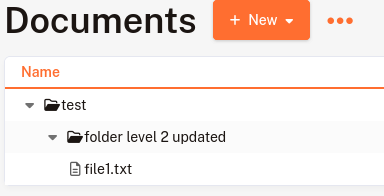
    empty folder

    Doc/Documentation manager
    17.0
    Empty
    • [ ] enhancement
    • [ ] internal improvement
    Empty
    Stage
    Empty
    Closed
    2026-02-09
    Attachments
    Folder without content
    Folder with content
    References
    Referenced by request #45606

    Follow-ups

    User avatar
    • Original Submission
      Something went wrong, the follow up content couldn't be loaded
      Only formatting have been changed, you should switch to markup to see the changes
    User avatar
    • Original Submission
      Something went wrong, the follow up content couldn't be loaded
      Only formatting have been changed, you should switch to markup to see the changes